

Job ZILLA and MATMAS

Today I am thrilled to uncover a new TLP module … introducing our powerful Jobs Engine module! The Jobs Engine is used whenever you need to execute background tasks (we call them jobs).
Jobs come to rescue in many scenarios, here are some:
- Receiving messages from external systems, for example receiving MATMAS IDOCs from SAP.
- Executing long running tasks, for example when exporting grid data to an excel from the UI.
- Executing maintenance tasks, for example every week-end a job to archive records that exceeded their retention period.
- Monitoring a local or FTP directory and process any files placed in it.
- When sending data to external systems, messages are typically created as jobs and dispatched asynchronously. This job-based delivery ensures that if the external system is temporarily unavailable, the data stays safely queued preventing any data loss.
So lets deep dive into the jobs engine module, as usual we will do it with a real case scenario. today we are going to implement a MATMAS channel to receive material master data from SAP and create/update materials in TLP.
Architecture
The Job Engine architecture is flexible, powerful, and super fast, the image below followed by the key-concepts will help you better understand at high level the engine architecture:
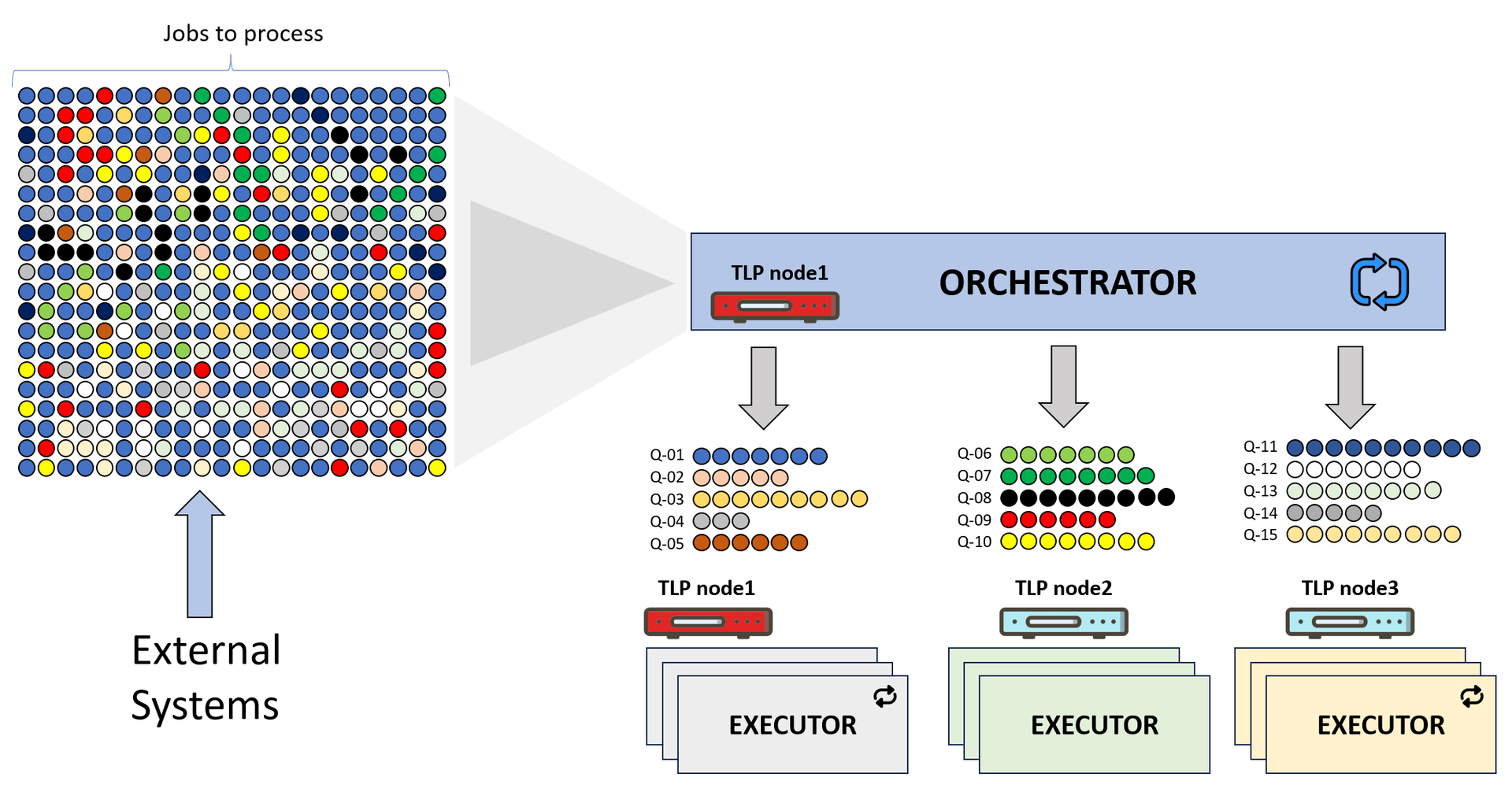
- Orchestrator: the orchestrator periodically fetches jobs, organizes them in logical queues and dispatches them to available TLP nodes. At any given time one and only one TLP node can act as the orchestrator, by default any TLP node can act as the orchestrator (see TLP node1), orchestrator election is managed automatically by TLP.
- Executor: the orchestrator dispatches jobs to executors, executors processes them, each TLP node is by default an executor node (see TLP node1, node2, and node3). To increase parallelism each TLP executor node instantiates multiple threads to process jobs in parallel.
- Queue: is a logical grouping of jobs whose execution must be sequential, for example if SAP creates two materials: A and B and soon after updates material A, we will receive three jobs. The two jobs related to material A will form a logical queue Q1 while material B job will form Q2. Processing Q1 jobs the engine must first process the job that created material A and then the job that updated it, if the creation job fails for whatever reason it will block Q1; the 2nd job will not be processed until the 1st is either successfully processed or archived. Q2 jobs can be processed any time even before Q1.
- Job: is a single task, jobs are created by external systems or by the engine itself in case of scheduled jobs.
- Job Type: defines a specific type of job, for example MATMAS is one job type, while BATMAS is another, the Job Type specifies the processor that knows how to process that specific job.
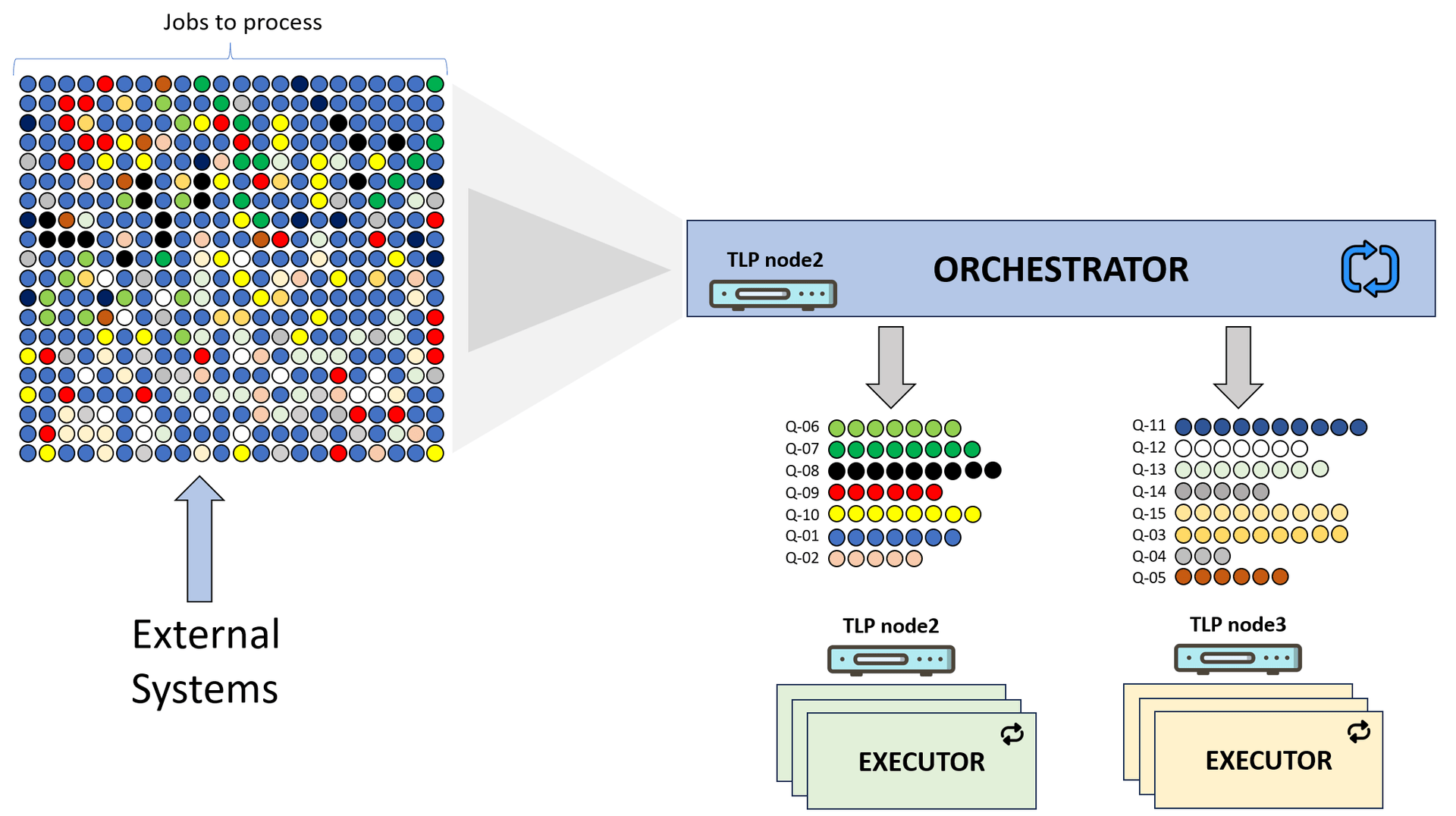
In the above architecture, if node1 goes down for whatever reason (e.g. maintenance) available nodes - in a matter of seconds - will automatically elect a new orchestrator (e.g. node2) and any dispatched queues to node1 will be re-dispatched to available nodes.
MATMAS job
Now it is time to implement logic to receive and process MATMAS IDOCS from SAP, the job type will be named SAP-I-01 and its processor class is very simple.
Tip
Job processor classes can be implemented in java or groovy, in this example we are going implement them in java.
The following is a simplified example of a MATMAS IDOC generated by SAP, our SAP-I-01 processor will parse such XML and create or update materials in TLP, in our case we are interested only in the following attributes:
- MATNR: Material number
- MTART: Material type, we will use the same type of SAP.
- MEINS: Base unit of measure, we will use the same UM of SAP.
- MAKTX: Default material description
<MATMAS05>
  <IDOC BEGIN="1">

    <!-- IDOC header -->
    <EDI_DC40 SEGMENT="1">
    	...
    </EDI_DC40>

    <!-- Mandatory Base Segment -->
    <E1MARAM SEGMENT="1">
      <MSGFN>005</MSGFN>
      <MATNR>A000123</MATNR>   <!-- Material Number -->
      <ERSDA>20250804</ERSDA>
      <ERNAM>SMITHJ</ERNAM>
      <MTART>FERT</MTART>      <!-- Material Type -->
      <MBRSH>01</MBRSH>
      <MATKL>1010</MATKL>
      <MEINS>EA</MEINS>        <!-- Base UoM -->
      <COMPL>00</COMPL>
    </E1MARAM>

    <E1MAKTM SEGMENT="1">
      <MSGFN>005</MSGFN>
      <SPRAS>E</SPRAS>
      <MAKTX>Standard Widget</MAKTX>	<!-- Material Description -->
    </E1MAKTM>

  </IDOC>
</MATMAS05>
Based on the above, here is the code of our processor the calculateQueue is responsible to calculate the logical queue which in our case is the material number, while the process method will upsert the received material.
public class SapI01MaterialMasterDataProcessor extends BaseJobProcessor {

	@Override
	public String calculateQueue(Job job) throws Exception {
		var doc = parse(job);
		var xpath = XPathFactory.newInstance().newXPath();

		return xpath.evaluate("/MATMAS05/E1MARAM/MATNR", doc);
	}

	@Override
	public void process(Job job) throws Exception {

		var doc = parse(job);
		var xpath = XPathFactory.newInstance().newXPath();

		var matnr = xpath.evaluate("/MATMAS05/E1MARAM/MATNR", doc);
		var mtart = xpath.evaluate("/MATMAS05/E1MARAM/MTART", doc);
		var meins = xpath.evaluate("/MATMAS05/E1MARAM/MEINS", doc);
		var maktx = xpath.evaluate("/MATMAS05/E1MAKTM/MAKTX", doc);

		// Create material if it doesn't exist
		var material = materialRepo.findByName(matnr);
		if (material == null) {
			var ctx = new CreateMaterialCtx();
			ctx.setNumber(matnr);
			ctx.setVersion("1");

			material = materialService.create(ctx).getMaterial();
		}

		// Update the material
		var ctx = new UpdateMaterialCtx();
		ctx.setMaterial(material);
		ctx.setStockUom(Optional.ofNullable(uomCache.getByName(meins)));
		ctx.setDescription(Optional.ofNullable(maktx));
		ctx.setMaterialType(Optional.ofNullable(mtart));

		materialService.update(ctx);
	}


}
Testing the job
Its testing time! in this video we explain the architecture of Job ZILLA and simulate receiving multiple MATMAS messages from SAP using a simple python script.
Stress test
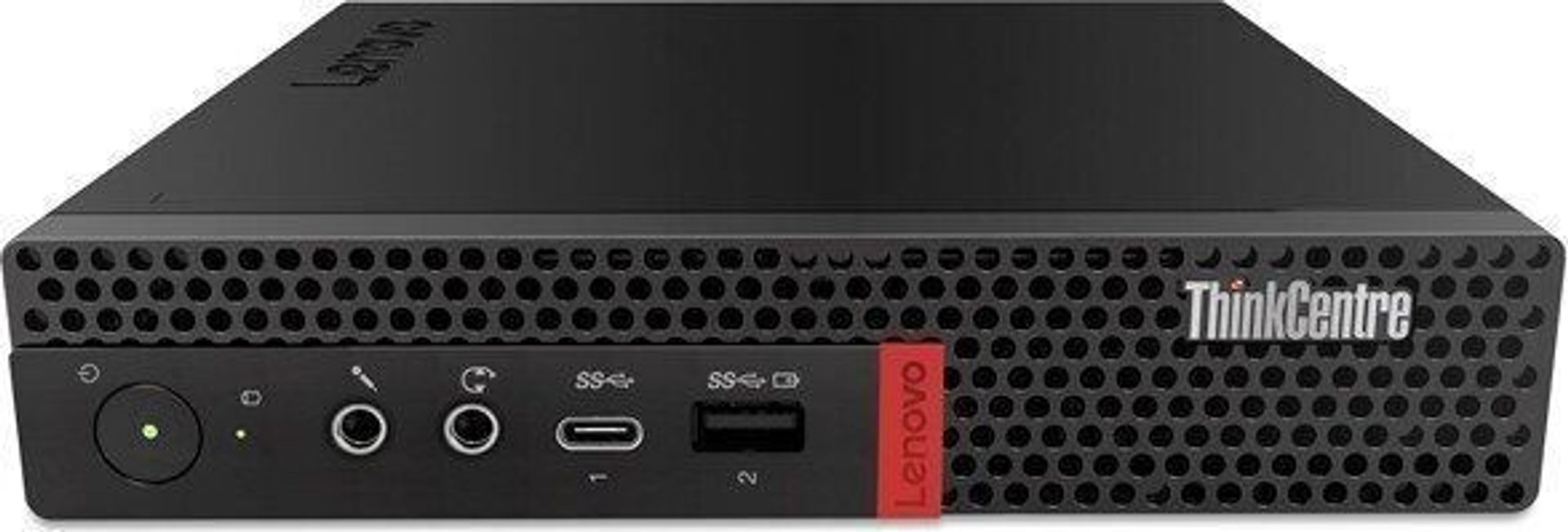
In this test we will process 10000 jobs in an attempt to stress the system, for our test we used an old Lenovo ThinkCentre M720q with an Intel(R) Core (TM) i5-8400T CPU @ 1.70 GHz , 6 logical processors, and 16 GB of RAM, the computer runs all TLP nodes and the database.
To better observe what is happening, we conducted the test as follows:
- We paused the Orchestrator, Poller, and Executor this way jobs remain in status created.
- We started the Orchestrator to see how jobs will be dispatched, in a couple of seconds jobs were dispatched to all three nodes.
- Finally we started the Poller and Executor so jobs got processed, overall it took the system 70 seconds to process all 10000 materials.
Resilience
Job ZILLA was crafted on the premise that TLP is a distributed platform, in an event of a node failure for whatever reason one of the following happens:
- If the node is NOT the Orchestrator, then the Orchestrator will re-dispatch all jobs assigned to the failing node to available executor nodes.
- If the node is an Orchestrator, then available nodes will elect a new orchestrator which in turn will re-dispatch all jobs assigned to the failing node.
To see it in action, you can watch this video on our YouTube channel.
Summary
Job ZILLA is an important module in our TLP platform, we use it to manage asynchronous tasks efficiently, it was crafted from scratch taking in consideration:
- That the TLP platform is a distributed system, thus it utilizes all nodes to quickly process jobs.
- Resiliency, maintenance activities or un-expected failures of some application nodes MUST NOT impact jobs processing.
- User friendly management, a simple and intuitive UI to manage jobs and easily see what is happening in the system when needed.
- Years of experience in implementing solutions that require message exchanges between systems.
— Omar