

Meet Jarod, the TLP AI Assistant

Jarod, our AI assistant, is now available right inside the TLP platform to simplify your everyday tasks. Here are some of the practical ways Jarod can help:
- Saves Time on Daily Tasks: Handles routine, repetitive operations so you can complete everyday workflows faster.
- Supports Dev & Testing Teams: Quickly prepares test data and scenarios, saving engineering and QA teams time on setup.
- Locate Missing Stock: You don’t find a pallet in your warehouse? ask Jarod to track its latest movements.
- Extracts Data & Reports: Quickly retrieves the information and reports you need without manual searching.
- Executes Admin Tasks & Analysis: Handles administrative duties and performs deep data analysis on demand.
Note
Why Jarod? The name Jarod was influenced by the main character of a TV Series named The Pretender, the series follows Jarod, a young man who is a “Pretender”, a genius impostor able to quickly master the complex skill sets necessary to impersonate a member of any profession… read more
As usual, if you prefer watching a video instead of reading check it out here:
Before we start
We integrated Jarod natively into our TLP platform so that every solution built on top of TLP, such as our WMS can automatically leverage its capabilities, here are some key-decisions we took in the design of Jarod:
- Jarod operates using your current user permissions. If your account is restricted from adjusting stock units, Jarod is subject to the exact same restriction..
- We integrate with multiple LLM providers such as: Claude, Gemini, DeepSeek, and OpenAI.
- To manage costs effectively, system administrators can assign specific LLMs by user role; for example, granting managers access to top-tier OpenAI and Claude models while restricting operators to DeepSeek.
- Jarod is environment-aware. In development and quality environments, it has greater operational freedom, for instance, allowing users to manually create batches. In production, however, Jarod capabilities are restricted by business rules. Actions like creating batches cannot be performed manually in production, as those records must be imported directly from SAP.
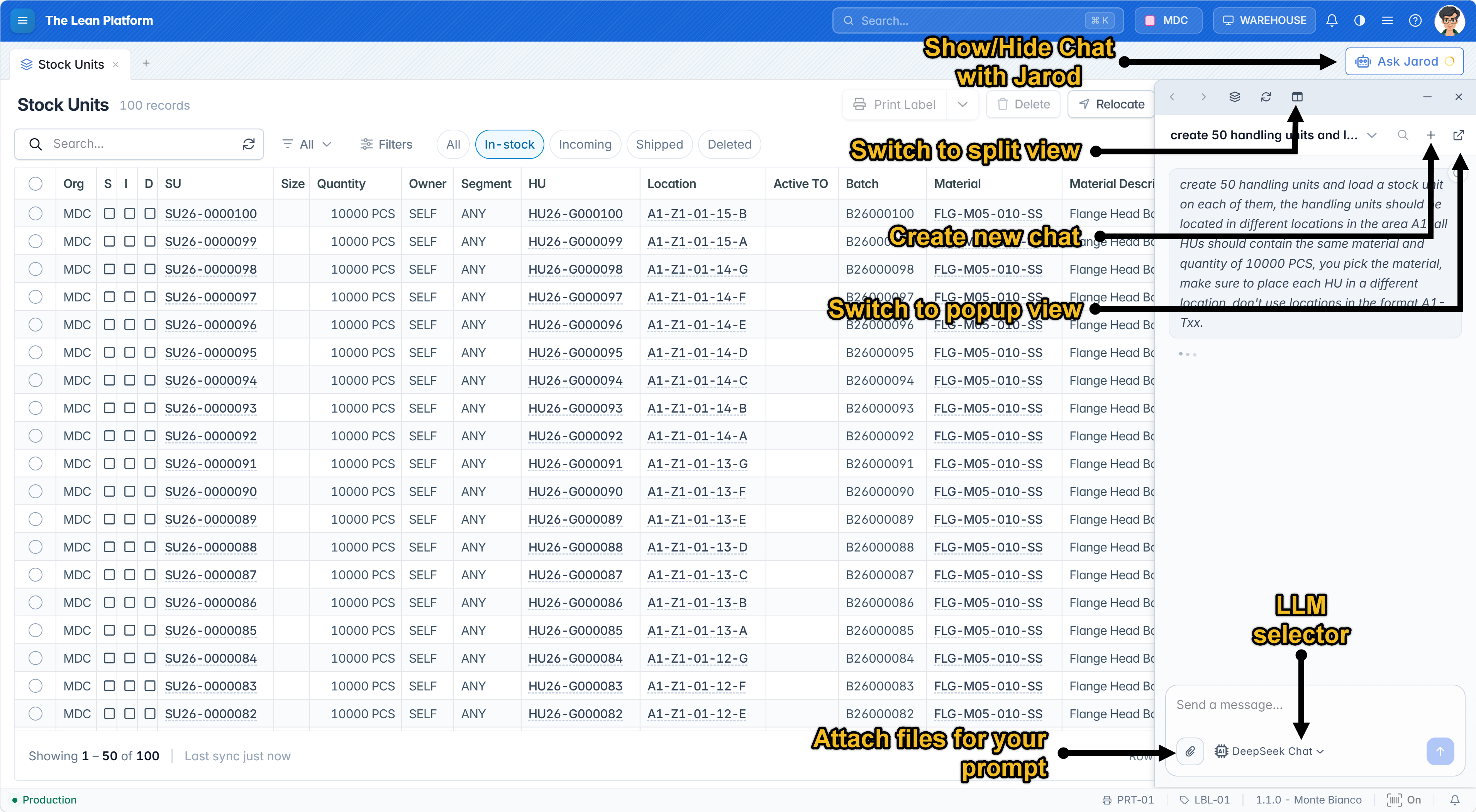
Jarod is always accessible from the top-right corner, directly below your avatar image (as shown in Figure 1). Simply click the button to open the panel. You can choose to view the panel as an overlay on top of your content (My preferred view), side-by-side, or as a pop-up window.
Todays Scenario
In this post I will show you a concrete example related to stock unit genealogy, but to be able to request a genealogy we need to first do some material transfers between stock units and since we are talking about AI why not let Jarod prepare the data for us :)
Data Preparation
To prepare the genealogy data I will first ask Jarod to create an initial stock unit, run a series of splits and transfers, and print the labels of the generated stock units too on a label printer.
Here is the prompt:
- Create a stock unit of 100 PCS (you choose the material and the location). This will be our INITIAL stock - unit.
- From the INITIAL stock unit split 11, 21, and 51 pieces.
- From the INITIAL stock unit split 11, 21, and 51 pieces.
- From the stock unit with 51 pieces split 5, 12, and 17 pieces.
- Transfer 3 pieces from the stock unit with 17 pieces to the INITIAL stock unit.
- Merge the stock units with quantities 5 and 12 into a new stock unit, then transfer 8 pieces from it to the INITIAL stock unit.
- Print all the labels on printer LBL-01.
- Show me a summary of what you did, including the stock unit code, initial quantity, current quantity, and notes.
In this video you can see the prompt (in italian) and how stock units are created by Jarod and labels printed on the physical printer.
The end-result of the previous prompt is that Jarod created an initial stock unit SU26-0000000001 and then executed several splits, transfers, and merges starting from this unit. The following table summarizes what happened:
| ID | Initial Quantity | Current Quantity | Notes |
|---|---|---|---|
| SU#1 | 100 PCS | 28 PCS | INITIAL stock unit. Split 11, 21, 51 and received 3 + 8 PCS back. |
| SU#2 | 11 PCS | 11 PCS | Split from SU#1. |
| SU#3 | 21 PCS | 21 PCS | Split from SU#1. |
| SU#4 | 51 PCS | 17 PCS | Split from SU#1, then split 5, 12, 17. |
| SU#5 | 5 PCS | 0 PCS | Split from SU#4, merged into SU#8. |
| SU#6 | 12 PCS | 0 PCS | Split from SU#4, merged into SU#8. |
| SU#7 | 17 PCS | 14 PCS | Split from SU#4, transferred 3 PCS to SU#1. |
| SU#8 | 17 PCS | 9 PCS | Merge of SU#5 and SU#6, transferred 8 PCS to SU#1. |
Testing the genealogy
Now that our scenario is ready, we can move on to the actual test. so we ask Jarod the following prompt:
Show me the forward genealogy of the INITIAL stock unit.
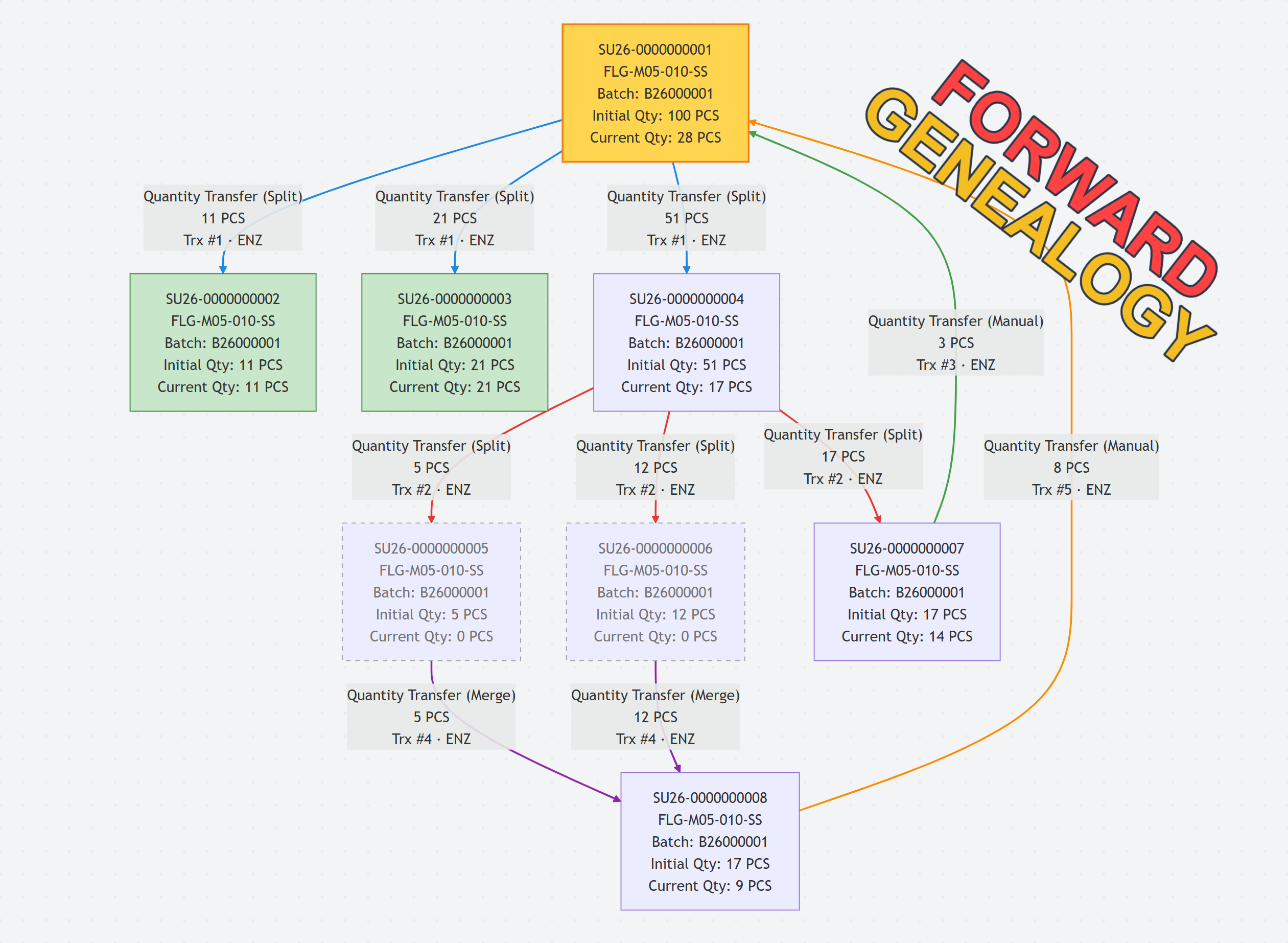
And the answer of Jarod is the flowchart shown in Figure 2, Let’s walk through the graph in Figure 3 to see what happened:
- Starting from the INITIAL stock unit of 100 pieces, the user with trigram ENZ (which is Enzo) split 11, 21, and 51 pieces, which created three new stock units: SU#2, SU#3, and SU#4.
- Next, SU#4 was split again into 5, 12, and 17 pieces, which created SU#5, SU#6, and SU#7.
- 3 pieces were transferred from SU#7 back to the INITIAL stock unit.
- SU#5 and SU#6 (of 5 and 12 pieces) were merged into SU#8 with 17 pieces.
- 8 pieces were transferred from SU#8 to the INITIAL stock unit.
- Matching arrow colors and labels (e.g., blue arrows marked Trx #1) indicate actions executed within the same transaction. Separate transactions are distinguished by different colors and updated transaction numbers.
- All the operations are registered under the logged-in user: enzo, not under a generic AI user, because Jarod always acts on behalf of the currently logged user.
Summary
In this post we introduced Jarod, the AI assistant of the TLP platform. The key takeaways from todays post are:
- Describe it, don’t build it. Jarod turns a plain-language description into a complete test scenario in seconds, with stock units, splits, transfers, merges, it can even print labels!
- Same permissions as the user. Jarod acts with the profile and permissions of the logged-in user, and in production its capabilities are restricted to respect business rules.
- Your choice of model. Administrators decide which AI models (OpenAI, Claude, Gemini, DeepSeek) each user can use, which keeps costs and performance under control.
- Platform-wide. Since Jarod lives in the TLP platform, every solution built on top of it, including custom ones, can use it.
In the next posts I’ll show more use cases where artificial intelligence can make our operations simpler, faster, and more efficient. stay tuned!
— Omar